Dashboard Examples
This page provides various Lovelace dashboard examples for displaying departure information.
Custom Lovelace Card (Recommended)
For the best experience, install the dedicated openpublictransport-card via HACS.
Installation
- Open HACS in Home Assistant
- Go to Frontend
- Click the three dots in the top right and select Custom repositories
- Add the URL:
https://github.com/NerdySoftPaw/openpublictransport-card - Select Lovelace as category and click Add
- Search for "openpublictransport-card" and install it
- Restart Home Assistant (or clear browser cache)
Layouts
The card supports three layouts: table, compact, and trip.
Table Layout
Station-style departure board with dark or light theme.
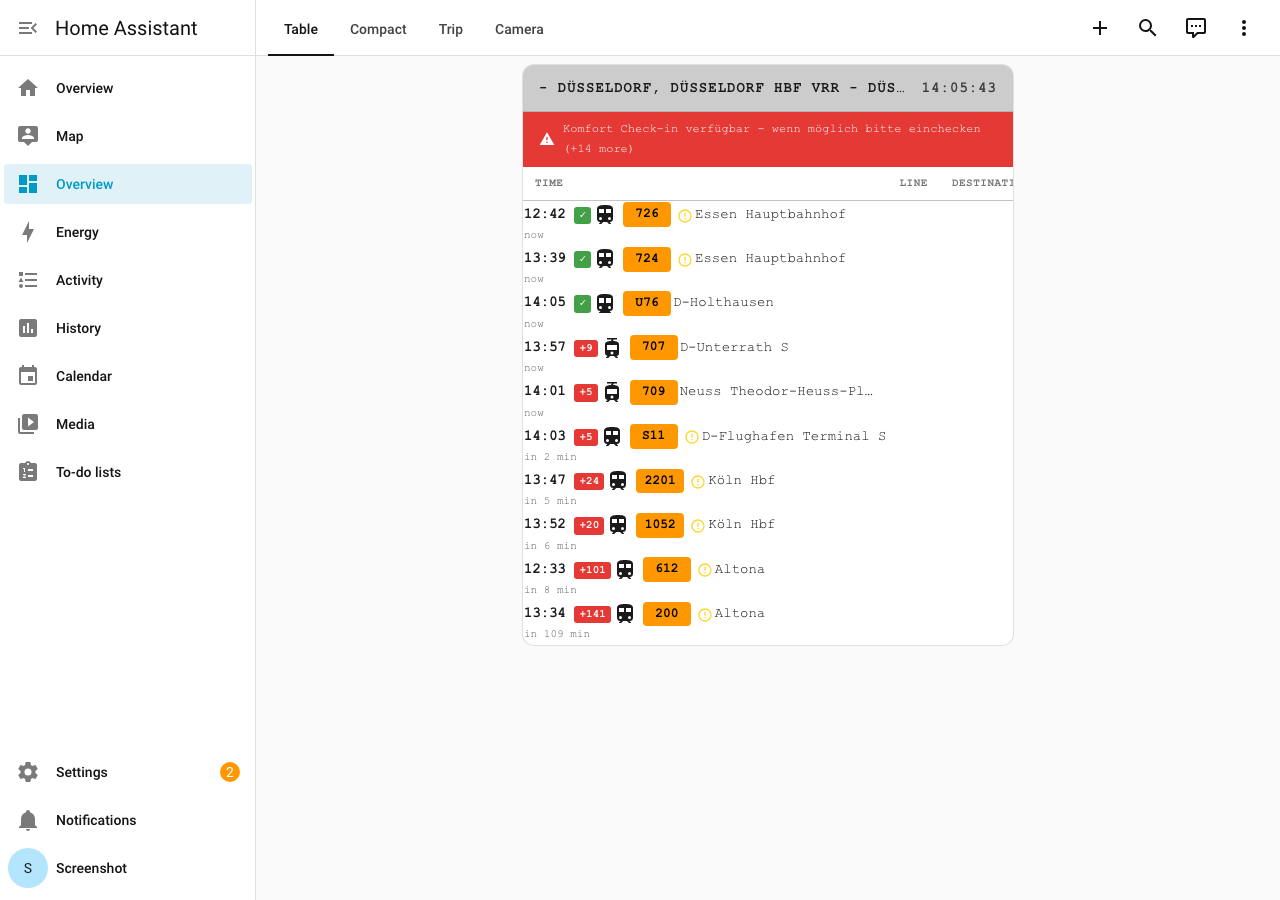
type: custom:openpublictransport-card
entity: sensor.openpublictransport_dusseldorf_hauptbahnhof
layout: table
theme: dark
Compact Layout
Horizontal chips for small dashboards and sidebar panels.
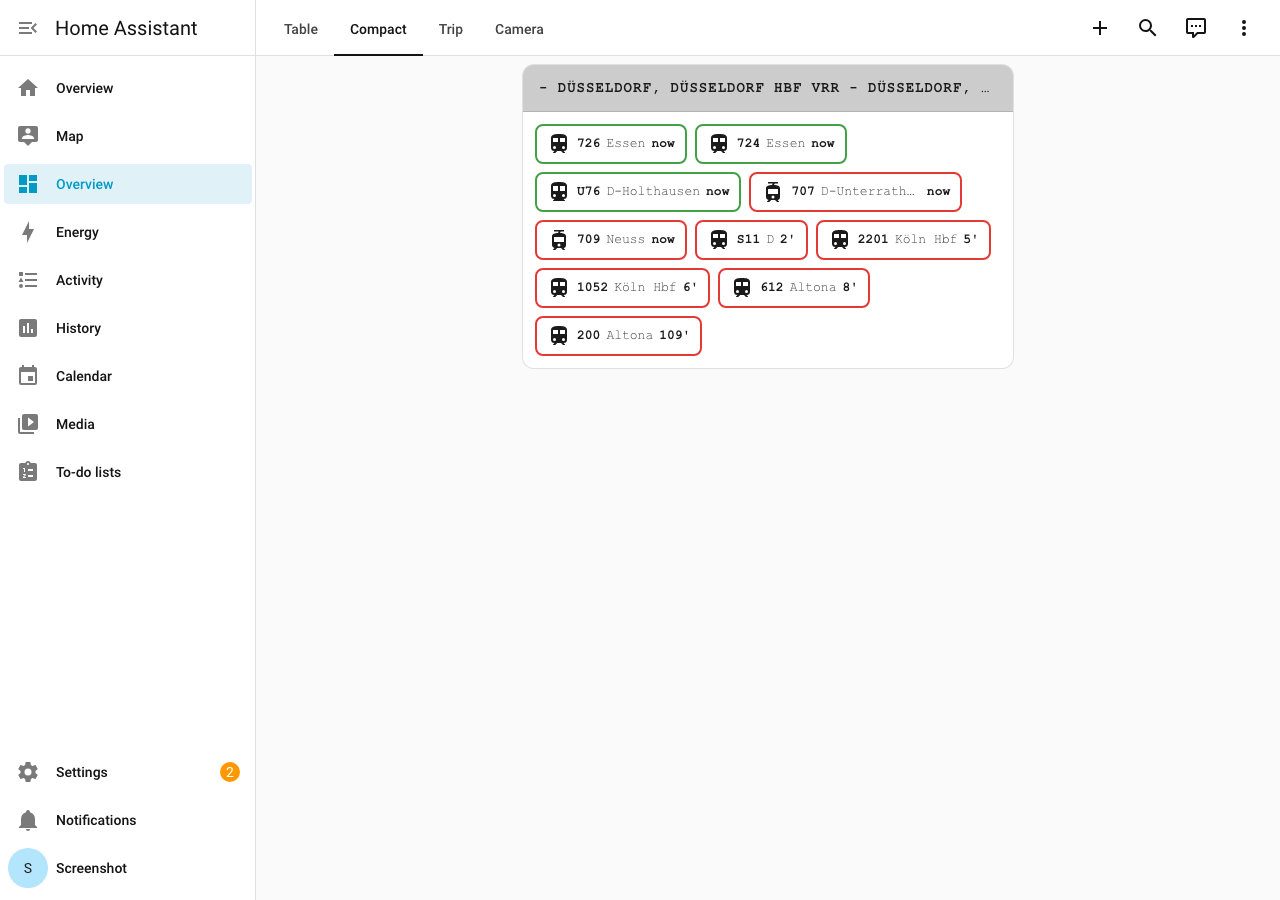
type: custom:openpublictransport-card
entity: sensor.openpublictransport_dusseldorf_hauptbahnhof
layout: compact
Trip Layout
Route display A -> B with transfer risk indicator.
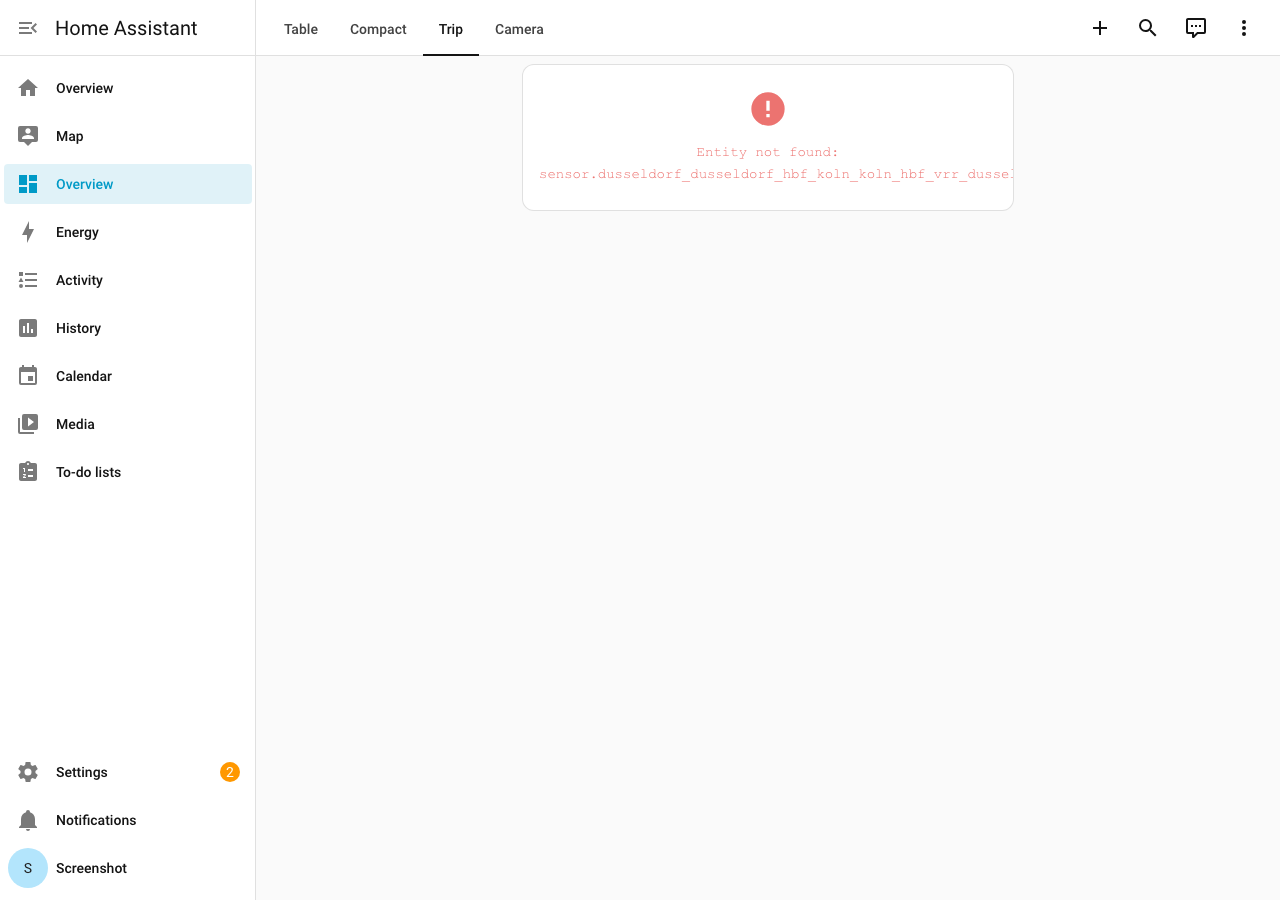
type: custom:openpublictransport-card
entity: sensor.openpublictransport_trip_dusseldorf_koeln
layout: trip
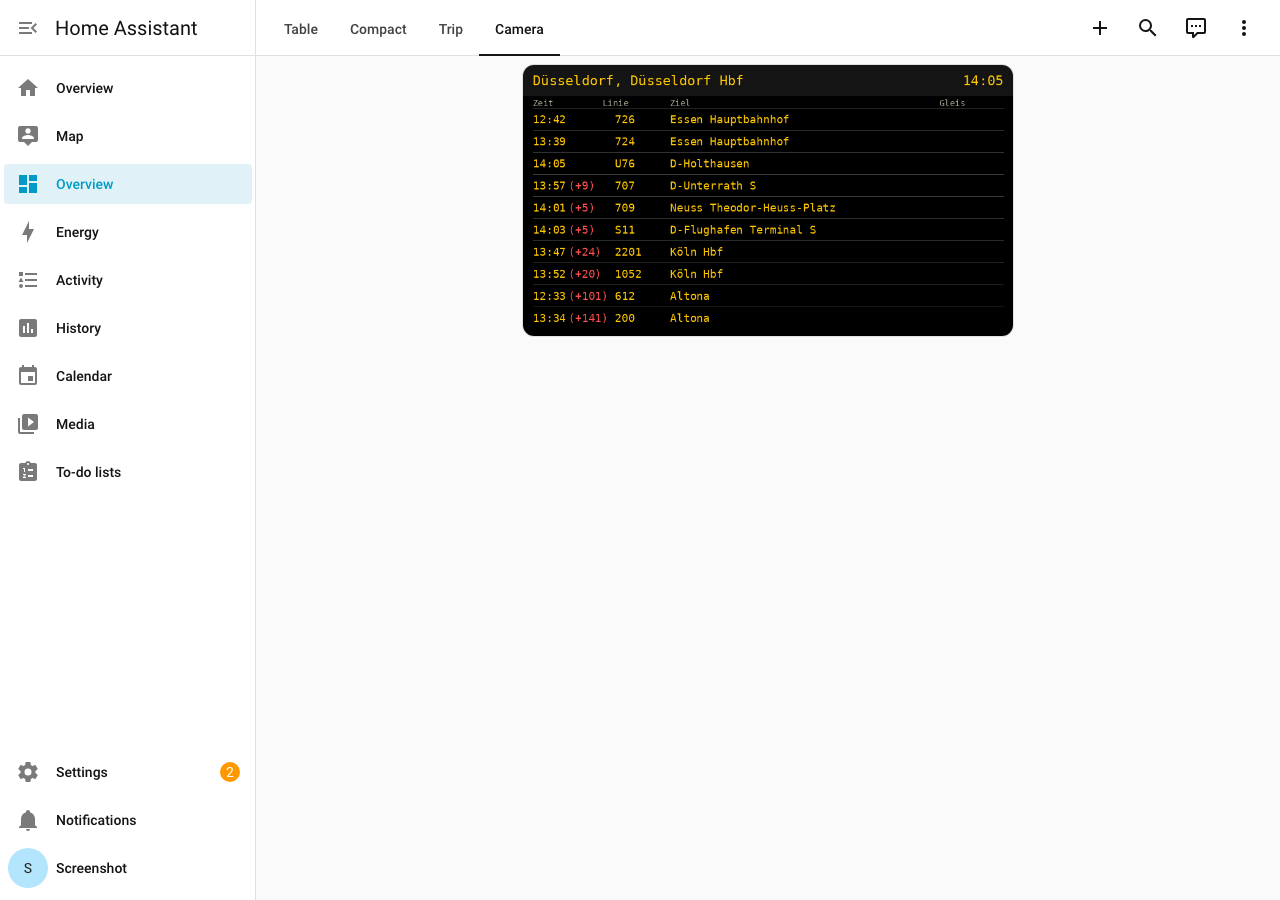
Camera Board
The camera entity renders a classic station departure board (yellow on black):
The examples below use standard Home Assistant cards as a fallback alternative.
Simple Entities Card
A basic card showing the sensor state and key attributes.
type: entities
title: Düsseldorf Hauptbahnhof
entities:
  - entity: sensor.openpublictransport_dusseldorf_hauptbahnhof
    name: Next Departure
  - type: attribute
    entity: sensor.openpublictransport_dusseldorf_hauptbahnhof
    attribute: next_departure_minutes
    name: In Minutes
    suffix: min
  - type: attribute
    entity: sensor.openpublictransport_dusseldorf_hauptbahnhof
    attribute: total_departures
    name: Available Connections
Markdown Card with Departures List
A detailed view showing multiple departures with delay information.
type: markdown
title: Departures - Hauptbahnhof
content: >
  {% set departures = state_attr('sensor.openpublictransport_dusseldorf_hauptbahnhof', 'departures') %}

  {% if departures %}
    {% for departure in departures[:5] %}
      **{{ departure.line }}** → {{ departure.destination }}
      🕐 {{ departure.departure_time }} {% if departure.delay > 0 %}(+{{ departure.delay }} min){% endif %}
      📍 Platform {{ departure.platform }}

    {% endfor %}
  {% else %}
    No departures available
  {% endif %}
Table Format with Markdown
A clean table layout for departures.
type: markdown
title: 🚉 Departures
content: >
  {% set departures = state_attr('sensor.openpublictransport_dusseldorf_hauptbahnhof', 'departures') %}

  {% if departures %}
    | Line | Destination | Time | Platform |
    |------|-------------|------|----------|
    {% for dep in departures[:5] %}
    | **{{ dep.line }}** | {{ dep.destination }} | {{ dep.departure_time }}{% if dep.delay > 0 %} <font color="red">(+{{ dep.delay }})</font>{% endif %} | {{ dep.platform }} |
    {% endfor %}
  {% endif %}
Custom Button Card for Manual Refresh
A button to manually refresh departure data.
type: button
name: Refresh Departures
icon: mdi:refresh
tap_action:
  action: call-service
  service: openpublictransport.refresh_departures
  service_data:
    entity_id: sensor.openpublictransport_dusseldorf_hauptbahnhof
Mushroom Chips Card
Using Mushroom cards for a compact display.
type: custom:mushroom-chips-card
chips:
  - type: entity
    entity: sensor.openpublictransport_dusseldorf_hauptbahnhof
    icon: mdi:train
    content_info: state
  - type: template
    icon: mdi:clock-outline
    content: >
      {{ state_attr('sensor.openpublictransport_dusseldorf_hauptbahnhof', 'next_departure_minutes') }} min
  - type: template
    icon: mdi:refresh
    tap_action:
      action: call-service
      service: openpublictransport.refresh_departures
Conditional Card
Only show if departure is soon (less than 10 minutes).
type: conditional
conditions:
  - condition: numeric_state
    entity: sensor.openpublictransport_dusseldorf_hauptbahnhof
    attribute: next_departure_minutes
    below: 10
card:
  type: markdown
  content: >
    ⚠️ **Attention!** Your train leaves in {{ state_attr('sensor.openpublictransport_dusseldorf_hauptbahnhof', 'next_departure_minutes') }} minutes!
Auto-Entities with Template Entity Row
Dynamic list using auto-entities and template-entity-row custom cards.
type: custom:auto-entities
card:
  type: entities
  title: All Departures
filter:
  template: >
    {% set departures = state_attr('sensor.openpublictransport_dusseldorf_hauptbahnhof', 'departures') %}

    {% for departure in departures %}
      {{
        {
          'type': 'custom:template-entity-row',
          'name': departure.line + ' → ' + departure.destination,
          'icon': 'mdi:train',
          'state': departure.departure_time,
          'secondary': 'Platform ' + departure.platform + ' | in ' + departure.minutes_until_departure|string + ' min'
        }
      }},
    {% endfor %}
Full Dashboard Example
A comprehensive vertical stack combining multiple elements.
type: vertical-stack
cards:
  - type: markdown
    title: 🚉 Düsseldorf Hauptbahnhof
    content: >
      Next departure: **{{ states('sensor.openpublictransport_dusseldorf_hauptbahnhof') }}**

      In {{ state_attr('sensor.openpublictransport_dusseldorf_hauptbahnhof', 'next_departure_minutes') }} minutes

  - type: custom:mushroom-chips-card
    chips:
      - type: entity
        entity: sensor.openpublictransport_dusseldorf_hauptbahnhof
        icon: mdi:train
        content_info: state
      - type: template
        icon: mdi:clock-outline
        content: >
          {{ state_attr('sensor.openpublictransport_dusseldorf_hauptbahnhof', 'next_departure_minutes') }} min
      - type: template
        icon: mdi:refresh
        tap_action:
          action: call-service
          service: openpublictransport.refresh_departures

  - type: markdown
    content: >
      {% set departures = state_attr('sensor.openpublictransport_dusseldorf_hauptbahnhof', 'departures') %}

      {% if departures %}
        | Line | Destination | Time | Platform |
        |------|-------------|------|----------|
        {% for dep in departures[:5] %}
        | **{{ dep.line }}** | {{ dep.destination }} | {{ dep.departure_time }}{% if dep.delay > 0 %} <font color="red">(+{{ dep.delay }})</font>{% endif %} | {{ dep.platform }} |
        {% endfor %}
      {% endif %}
Delay Status Card
Show delay status with the binary sensor.
type: entities
title: Delay Status
entities:
  - entity: binary_sensor.openpublictransport_dusseldorf_hauptbahnhof_delays
    name: Delays Detected
  - type: attribute
    entity: binary_sensor.openpublictransport_dusseldorf_hauptbahnhof_delays
    attribute: delayed_departures
    name: Delayed
  - type: attribute
    entity: binary_sensor.openpublictransport_dusseldorf_hauptbahnhof_delays
    attribute: max_delay
    name: Max Delay
    suffix: min
  - type: attribute
    entity: binary_sensor.openpublictransport_dusseldorf_hauptbahnhof_delays
    attribute: average_delay
    name: Average Delay
    suffix: min
Statistics Card
Display departure statistics.
type: glance
title: Station Statistics
entities:
  - entity: sensor.openpublictransport_dusseldorf_hauptbahnhof
    name: Next
  - type: attribute
    entity: sensor.openpublictransport_dusseldorf_hauptbahnhof
    attribute: total_departures
    name: Total
  - type: attribute
    entity: sensor.openpublictransport_dusseldorf_hauptbahnhof
    attribute: delayed_count
    name: Delayed
  - type: attribute
    entity: sensor.openpublictransport_dusseldorf_hauptbahnhof
    attribute: on_time_count
    name: On Time